
Passend zu Ihrem PC
-


Monitor Monitor Samsung S24H650GD 24" LED 1920x1200 4ms 60Hz PLS DisplayPort HDMI VGA 3x USB 3.0 schwarz
Sehr guter Zustand. (Grade A-)Anschlüsse:1x DisplayPort1x HDMI1x D-Sub (VGA)Lieferumfang: - Monitor- Stromkabel- wahlweise Videokabel12 Monate Gewährleistung. Rechnung inkl. 19% MwSt. Bild Paneltyp: PLS Bildschirmdiagonale: 24 Zoll Pixelfehlerklasse: N/A Pixelabstand: N/A Bildaufbauzeit (r + f): 4 ms Bildwiederholrate: 60Hz Auflösung (empfohlen): 1920 x 1200 Helligkeit: 250 cd/m² Kontrast: 1000 zu 1 Blickwinkel 10:1 (v): 160 ° Blickwinkel 10:1 (h): 170 ° Anzahl der Farben: 16,70 Mio. Features Lautsprecher: Nein Farbmanagement: RGB Farbtemperatur Interpolation wählbar: Ja Besondere Ausstattung: Widescreen LED-Backlight Eingänge Signaleingang: 1x DisplayPort 1x HDMI 1x D-Sub (analog) Eingänge (Anzahl): 3 HDCP: Ja USB-Hub: 2x USB Ergonomie Fuß (drehbar): Ja Fuß (höhenverstellbar): Ja Display neigbar: Ja Pivotfunktion: Ja VESA-Montage: nein TCO-Norm: TCO 6.0 Energie Netzteil: intern Stromverbrauch: 28 Watt Optik und Maße Abmessung (B x H x T): 559 x bis 546 x 236 Gehäusefarbe: schwarz Gewicht: 6,7kg
ab 59,00 €
-


Monitor Monitor Lenovo ThinkVision T2454pA 24" WUXGA 1920x1200 16:10 LED HDMI DP VGA 4x USB 3.0
Sehr guter Zustand. (Grade A-)Anschlüsse:1x DisplayPort1x HDMI1x D-Sub (VGA)4x USB 3.01x AudioausgangLieferumfang: - Monitor- Stromkabel- wahlweise Videokabel12 Monate Gewährleistung. Rechnung inkl. 19% MwSt. Feature Spezifikation Monitorgröße 24 Zoll Anzeigebereich 518,4 mm (H) x 324,0 mm (V) Native Auflösung 1920 x 1200 Kontrastverhältnis (typisch) 1000:1 Helligkeit (typisch) 300cd/m2 Seitenverhältnis 16:10 Pixelabstand (mm) 0,270 mm (H) x 0,270 mm (V) Farben 16,7 Mio Horizontaler Betrachtungswinkel 178 Grad (bei 10:1 Kontrastverhältnis) Vertikaler Betrachtungswinkel 178 Grad (bei 10:1 Kontrastverhältnis) Reaktionszeit 7 ms Video Eingang VGA+HDMI+DP Signalkabel - VGA 1,8 m Signalkabel - DP 1,8 m USB Hub 4 x USB3.0 USB -Kabel 1,8 m SYNC-Typ Separate TTL SYNC auf Grün Nein Lünettenbreite (links & rechts) 18,8mm Lünettenbreite (oben) 18,8mm Blendenbreite (unten) 18,8 mm Neigung -5 bis 30 Grad Schwenken -45 Grad bis 45 Grad Aufzug 110mm Drehpunkt 0~90 Grad, im Uhrzeigersinn Soundbar-Aufsatz Ja Winzige Unterstützung Stützklemmhalterung VESA-Halterung 100 mm x 100 mm Steckplatz für Kensington-Schloss Ja Kabelmanagement Ja OSD Ja OSD-Sprachen 8 Benutzerdefinierte Anzeigemodi 20 Stromverbrauch (typ./max.) 22 W / 54 W Stromverbrauch (Ruhezustand/Aus) <0,5 W ISO 9241-307-konform Ja weiterführende Information:https://support.lenovo.com/us/de/solutions/pd100737-thinkvision-t2454p-24-inch-wuxga-led-backlit-lcd-monitor-overview-and-service-parts
ab 49,00 €
-

Zubehör Intel M.2 NGFF WLAN module AC 3165 NGW 802.11ac Wi-Fi 5 BT 4.2 FRU 00JT497
Good condition.
ab 9,90 €
-

Zubehör Intel M.2 NGFF WLAN module AC 3165 NGW 802.11ac Wi-Fi 5 BT 4.2 FRU 00JT497
Good condition.
ab 9,90 €
-

Zubehör HP USB-C Dock G4 L13899-001 4x USB 2x DP HDMI LAN 90W für HP Elitebook ZBook Elite uvm.
Guter gebrauchter Zustand.Anschlüsse Front: - USB-C- USB 3.0Anschlüsse hinten:- 1x USB 3.0- 2x USB 2.0- 1x HDMI 1.4- 2x DisplayPort 1.2- 1x RJ-45 (LAN)Lieferumfang:- HP USB-C Dock G4- USB-C zu USB-C Kabel- 90W Netzteil- Stromkabelmindestens kompatibel mit: - grundsätzlich auch mit anderen Marken verwendbar- HP ProBook- 430 g5, 440G5, 450 G6, 470 G5, 640 G4, 645 G4, 650 G4, x360 11 G1 EE, x360 11 G2 EE- HP EliteBook- 735 G5, 745 G5, 755G5 830 G5, 840 G5 840r G4, 850 G5, x360 1020 G2, 1030 G2, 1040 G2, Folio G1 - HP ZBook- 15 G3 & G4, 17 G3 & G4, Studio G3 MWS, Studio G4 MWS - HP Elite- x2 1012 G1, 1012 G2, x3 - HP Spectre Pro 13 G1 Notebook PC - HP Pro x2 612 G2 - HP Chromebook 13 12 Monate Gewährleistung.Rechnung inkl. 19% MwSt.
ab 28,00 €
-


Monitor Monitor Samsung S24E450D 24" LED 1920x1080 60Hz DisplayPort DVI VGA schwarz
Sehr guter Zustand. (Grade A-)Anschlüsse:1x DisplayPort1x DVI-D1x D-Sub (VGA)Lieferumfang: - Monitor- Stromkabel- wahlweise Videokabel12 Monate Gewährleistung. Rechnung inkl. 19% MwSt. Bild Paneltyp: TN Bildschirmdiagonale: 24 Zoll Pixelfehlerklasse: 2 Pixelabstand: 0,280 mm Bildaufbauzeit (r + f): 5 ms Bildwiederholrate: 60Hz Auflösung (empfohlen): 1920 x 1080 Helligkeit: 250 cd/m² Kontrast: 1000 zu 1 Blickwinkel 10:1 (v): 160 ° Blickwinkel 10:1 (h): 170 ° Anzahl der Farben: 16,70 Mio. Features Lautsprecher: Nein Farbmanagement: RGB Farbtemperatur Interpolation wählbar: Ja Besondere Ausstattung: Widescreen LED-Backlight USB-Kabel DVI-Kabel Eingänge Signaleingang: 1x DisplayPort 1x DVI-D (digital) 1x D-Sub (analog) Eingänge (Anzahl): 3 HDCP: Ja USB-Hub: 2x USB Ergonomie Fuß (drehbar): Ja Fuß (höhenverstellbar): Ja Display neigbar: Ja Pivotfunktion: Ja VESA-Montage: Ja TCO-Norm: TCO 6.0 Energie Netzteil: intern Stromverbrauch: 23 Watt Optik und Maße Abmessung (B x H x T): 565 x 362-492 x 224 Gehäusefarbe: schwarz Gewicht: 4,9kg
ab 39,00 €
-
Zubehör HDMI - DVI-D Kabel, HDMI zu DVI-D Kabel 150cm NEU
HDMI - DVI-D Kabel, HDMI zu DVI-D Kabel 150cm NEU
ab 7,90 €
-
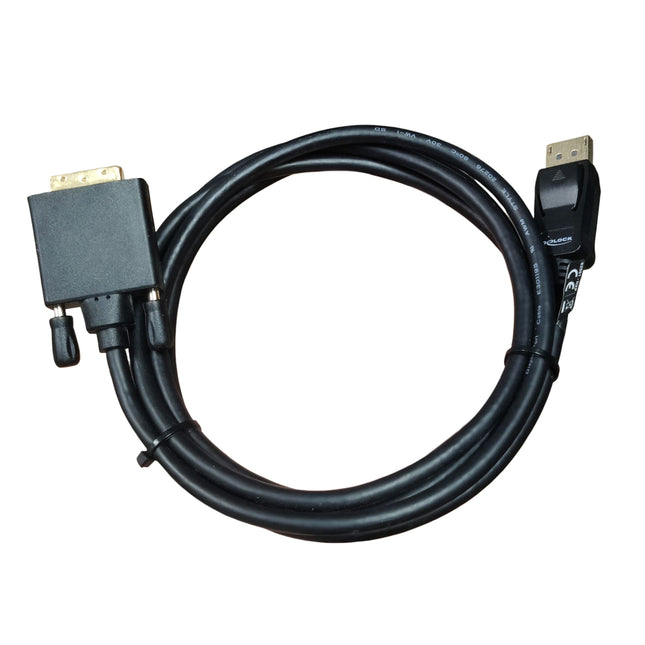
Zubehör Delock DP - DVI-D Kabel DisplayPort zu DVI-D Kabel 180cm NEU
Delock DP - DVI-D Kabel DisplayPort zu DVI-D Kabel 180cm NEU
ab 14,90 €
-


Monitor Monitor Samsung S24E450BL 24" LED 1920x1080 DVI D-SUB schwarz
Gereinigt und getestet. OHNE Displayport Anschluss (vgl. S24E450D)FULL HD, 60Hz, 24 Zoll.Anschlüsse:DVID-Sub (VGA)Lieferumfang: -Monitor-Stromkabel-DVI zu DisplayPort-Kabel (passend für unsere Mini-PCs)12 Monate Gewährleistung. Produkt ist differenzbesteuert nach §25a. Kein Ausweis der Mehrwertsteuer.
ab 43,00 €
-


Monitor Monitor Dell UltraSharp U3417W 34" Curved 60Hz 3440x1440 21:9 LED HDMI DP mDP 4x USB 3.0
Guter Zustand. (Grade B)Anschlüsse:1x DisplayPort 1.22x HDMI 2.01x mDP1x DisplayPort-out4x USB 3.01x AudioausgangLieferumfang: - Monitor- Stromkabel- wahlweise Videokabel12 Monate Gewährleistung. Rechnung inkl. 19% MwSt. weiterführende Information:https://dl.dell.com/manuals/all-products/esuprt_display_projector/esuprt_display/dell-u3417w-monitor_user's-guide_de-de.pdf
ab 229,00 €
-


Monitor Monitor HP Z38C 37,5" Curved 60Hz 3840x1600 21:9 LED IPS HDMI DP USB-C mit Tischhalterung
Guter Zustand. (Grade B)Kratzer am Rahmen und Halterung möglich.Feine Kratzer am Display möglich.Ohne Fuß, aber mit stabiler Tischhalterung, sehr gelenkig. Stabhöhe 76,5cmAnschlüsse:1x DisplayPort 1.21x HDMI 2.01x DisplayPort-out3x USB 3.01x USB-C (Upstream / Downstream)1x AudioausgangDer USB-Typ-C-Anschluss kann als DisplayPort-Audio-/Videoeingang, als USB 3.0-Upstream-Verbindung oder zur Stromversorgungvon Geräten mit bis zu 65 Watt verwendet werden. Die Ausgangsleistungen betragen 5 V/3 A, 5,25 V/3 A, 9 V/3 A, 10 V/3 A, 12 V/3 A, 15 V/3 A, 20 V/3,25 A, um15 W, 5,75 W, 27 W, 30 W, 36 W, 45 W, 65 W für HP-zertifizierte E-MARK-Kabel und nur 5 V/3 A für 15 W für andereKabelLieferumfang: - Monitor- Stromkabel- wahlweise Videokabel12 Monate Gewährleistung. Rechnung inkl. 19% MwSt. weiterführende Information:https://h20195.www2.hp.com/v2/getpdf.aspx/c05591685.pdf
ab 419,00 €
-

Zubehör Dell KB212-B SK-8120 QWERTZ schwarz deutsche USB Tastatur, gebraucht DP/N 0C648N
Guter Zustand. Kabelgebunden.
ab 4,90 €


